
Overview
Four years ago, I was working on a system that serves customers in multiple countries in the MENA region. The daily work with data was smooth and straightforward, and support and troubleshooting were manageable — if an engineer received a problem that required checking and exploring customer data, they could simply do that using the platform they liked, either locally on their machine or over the internet.
Over time, data regulations and compliance started evolving. Restrictive rules were added that companies had to follow — such regulations added rules on how data should reside (“data residency”) and who should have access to that data, especially Personally Identifiable Information (“PII”). This was a good transition that secured residents’ data, but it came with a challenge: the ease of exploration using cloud platforms became restricted, and engineers’ machines became monitored by intelligent tools that ensure those rules are followed. The problem with online tools is that you don’t know where the data you’re uploading will end up or what will happen to it.
Local tools and their challenges
Teams decided to rely on local machine tools as much as possible. IDEs like VSCode and Cursor support a couple of plugins that teams can use to understand structured data like JSON, XML, or YAML. This solved the issue but not entirely. There were a couple of problems with that approach:
- The search space is big — an engineer needs to find the proper plugin that provides what they are looking for: a plugin for XML, a plugin for JSON, etc.
- Trust is an issue with those plugins — you don’t know the author of the plugin or what they are doing in the background with the data; the IDE may still be connected to the internet in the background.
- Updates are not always backward compatible — an update can break the plugin, and this becomes a bottleneck.
- Context switching across many scattered tools reduces focus on business needs.
I started to feel the need for a toolkit that solves these issues. I wanted to have that in one place, and I wanted to keep my team’s productivity steady — or even increasing — while staying focused and maintaining security and data safety, and while following the regulations. That’s the problem FVP set out to solve. Here’s what it actually does.
What is FVP?
Enterprise-grade parsing. Zero data exposure.
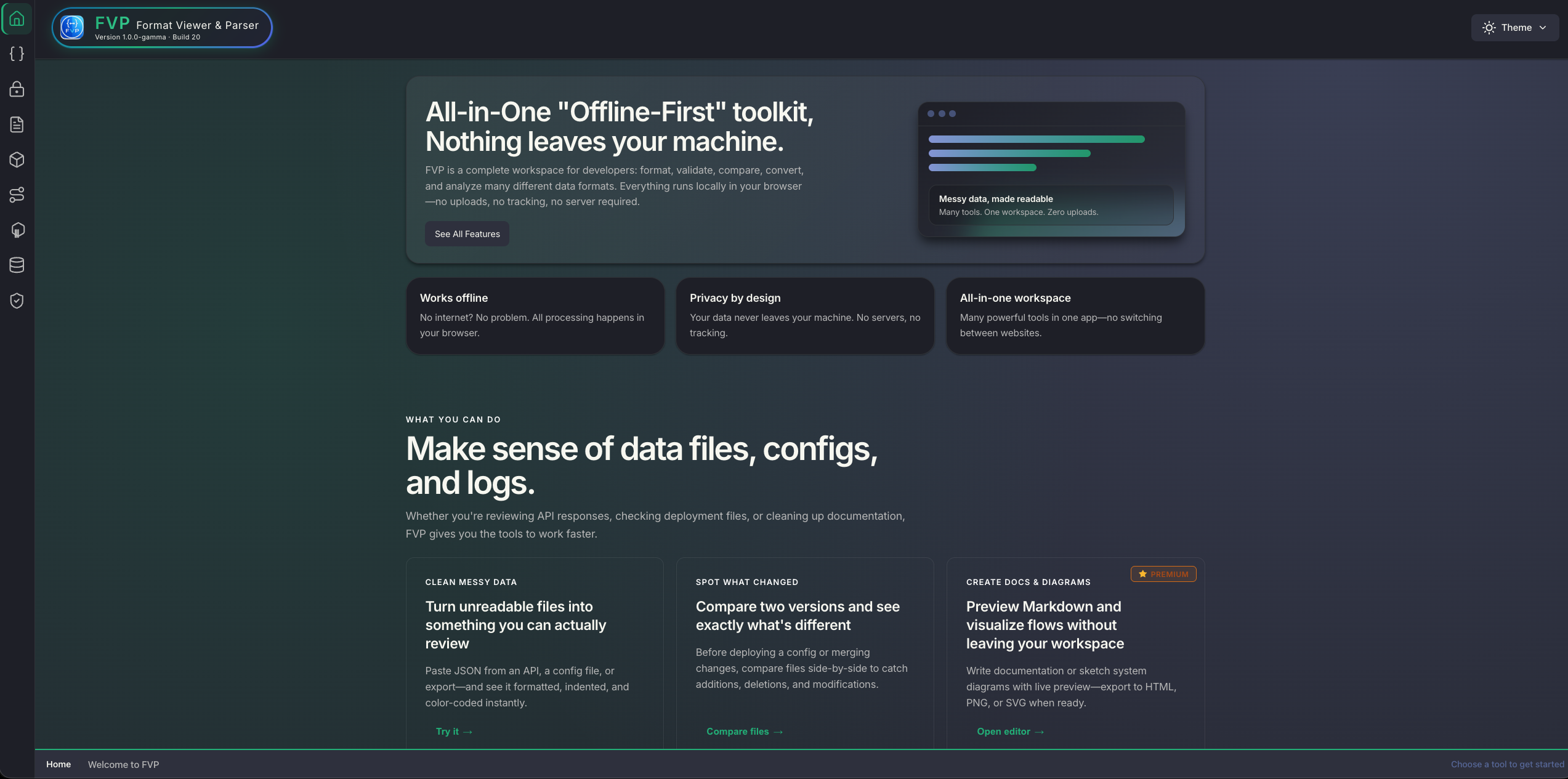
FVP is a professional offline-first workspace for parsing, validating, transforming, and analyzing structured data formats at scale. Keep sensitive payloads local, move faster with purpose-built tooling, and standardize data workflows across engineering teams. No servers. No uploads. No compromises.
Built for Professional Teams
- Privacy by design - every operation runs locally, ideal for regulated and security-sensitive environments.
- Production-scale performance - process everything from quick payload checks to 1GB investigation files.
- Operational confidence - consistent validation, clear diagnostics, and deterministic output across formats.
- All-in-one workflow - formatting, comparison, conversion, visualization, and export in a single tool.
- Offline reliability - dependable
file://operation for air-gapped, restricted, and travel scenarios.
Understanding by Visualizing
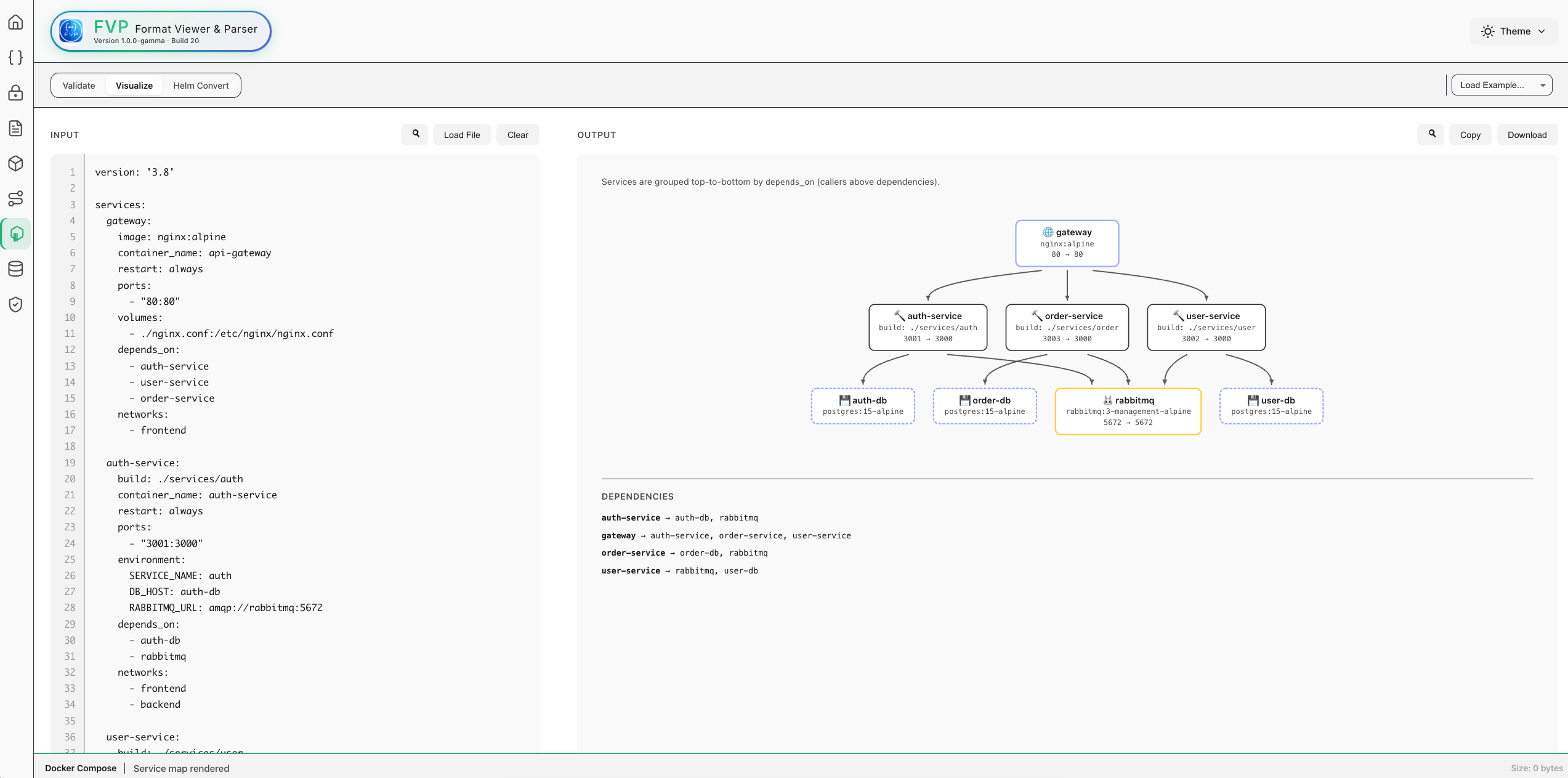
I’ve always relied on diagrams and charts to simplify my work — a picture can say more than a thousand words. With FVP, I wanted to bring that same idea everywhere: starting from structured data, and even infrastructure-as-code. The goal is simplicity — how quickly can you understand a large file? Definitely faster with visuals.
PII & Secrets — In Plain Terms
Catch sensitive data before it leaves your machine
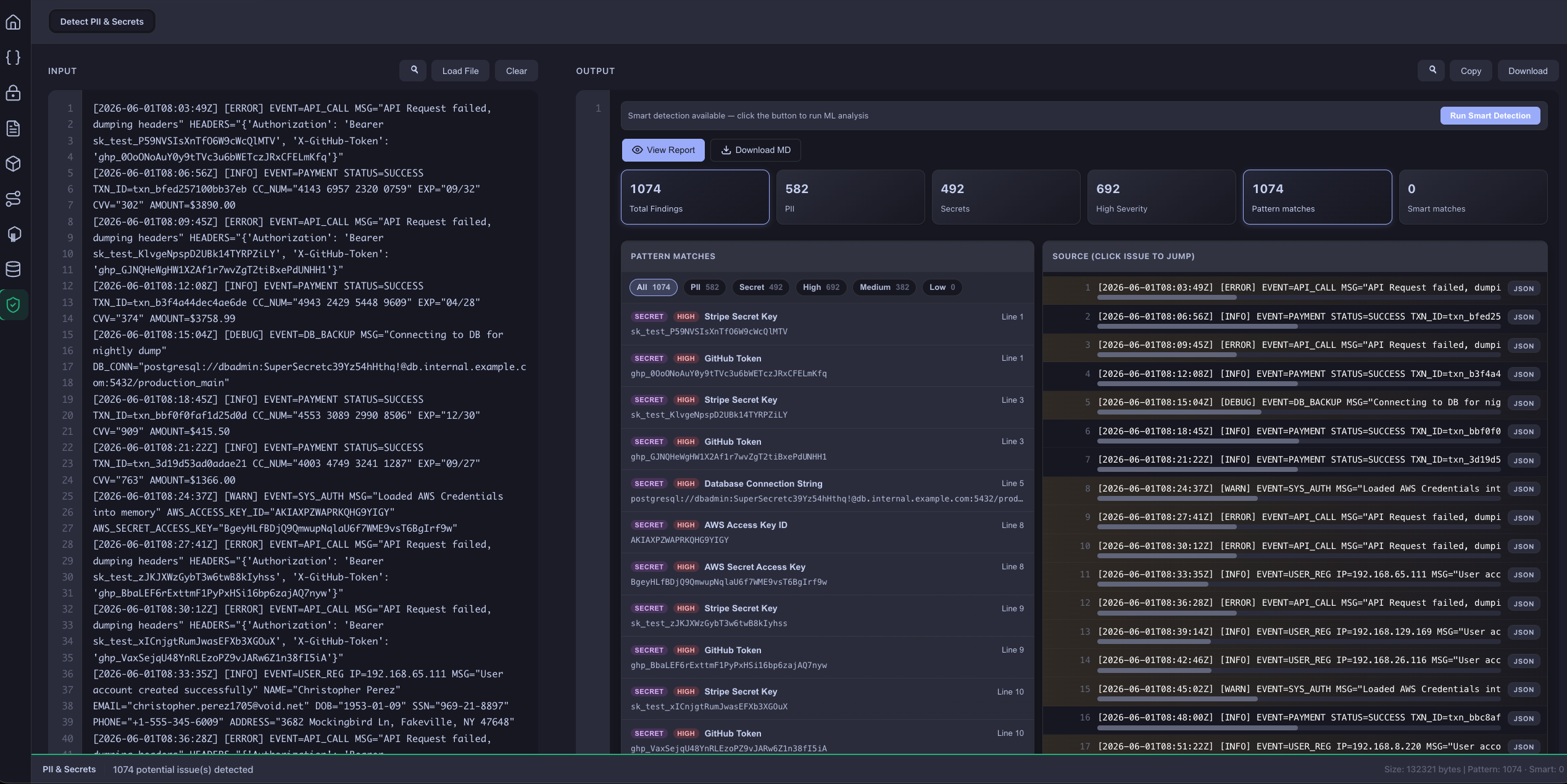
The PII & Secrets tab is your private safety check for logs, configs, exports, JSON, and any other text. Paste or upload a file — FVP scans it on your device and flags anything that looks like personal information or leaked credentials.
What It Finds
Instant pattern scan (Layer 1) — results as you type:
- Emails, phone numbers, credit cards, SSN-style IDs
- API keys, JWTs, AWS/GitHub/Stripe-style secrets, private keys
- Arabic national/mobile ID patterns (including Arabic-Indic digits)
Smart detection (Layer 2, optional) — a local ML pass for messier text: names, IDs, and mixed Arabic/English content that regex alone might miss. Still runs entirely on your machine — no cloud, no uploads.
How You Work With It
- Filter by PII vs. secret, severity, or detection layer
- Jump to the source line — click a finding to highlight it in context
- Inspect JSON lines without leaving the tab
- Export a privacy-safe report — counts, types, and line numbers only, never the actual sensitive values
Why Teams Use It
| Benefit | What It Means for You |
|---|---|
| Privacy-first | Your data never leaves your computer |
| Fast feedback | Pattern matches appear immediately; deeper scans run in the background |
| Shareable audits | Export stats-only reports your team can review safely |
| Works offline | No account, no API, no internet required for core scanning |
Bottom line: Before you commit, share, or ship a file — run it through PII & Secrets and know what’s hiding in the text, without sending that text anywhere.
What Makes FVP Different?
| Feature | FVP | Online Tools | Other Offline Tools |
|---|---|---|---|
| Works Offline | ✅ Fully | ❌ No | ⚠️ Sometimes |
| No Data Upload | ✅ Never | ❌ Always | ✅ Never |
| Large Files (1GB) | ✅ Yes | ❌ Limited | ❌ Rare |
| Multiple Formats | ✅ > 12 Formats | ⚠️ Usually 1-2 | ⚠️ Usually 1 |
| Diagram Viewer | ✅ Mermaid (10 types) | ⚠️ Separate tools | ❌ Rare |
| Interactive Zoom/Pan | ✅ Yes | ❌ No | ❌ No |
| Session Persistence | ✅ Auto-save | ❌ Manual only | ❌ None |
| Resizable Workspace | ✅ Draggable divider | ❌ Fixed layout | ❌ Fixed layout |
| Setup Required | ✅ None | ✅ None | ❌ Installation |
| Privacy Guarantee | ✅ 100% | ❌ Trust required | ✅ Yes |
| Enterprise Support | ✅ Available | ⚠️ Paid only | ⚠️ Varies |
Try It Yourself
FVP is live and ready to use — no installation, no signup, no data leaving your browser.
Drop in a JSON, YAML, XML, or Docker Compose file and see it parsed, validated, and visualized in seconds — or run it through PII & Secrets first to see exactly what’s hiding in the text, without sending that text anywhere. If it saves you time or you hit something worth fixing, I’d love to hear about it.